Your till knows what you sold. Your cameras know what happened.
Caffelytics turns the cameras you already own into arrivals, queues and table turns. It runs on your own machine. No video leaves the building.
sample readings
Figures are from a test recording.
The door. Who came in, and when.
“When does it really get busy on a Tuesday?”
Draw one line across your entrance, on the camera picture itself. Every crossing is counted, in and out, and sorted by the hour.
After a few weeks you stop guessing when Tuesday gets busy. You know, and you can build the rota on it.
- Arrivals today, and how many people are in the room now
- Occupancy against the capacity you state for the room
- Footfall for every hour, with the busiest hour named
The queue. Who waited, and who gave up.
“How long is the wait at the morning rush, really?”
Mark the patch of floor where people wait. Someone who stands there for three seconds has joined the queue, while someone walking straight through has not.
Caffelytics keeps the length of the queue and the longest wait, and counts the people who left before they reached the counter. These are the messages it sends, word for word:
-
6 people in the queueQueue too long. Must hold for 2 minutes before it fires.
-
Longest wait is 5.2 minutesWaiting time too long. Must hold for 1 minute.
-
3 waiting and no staff observed at the counterQueue not attended. The one critical alert. Must hold for 90 seconds.
Every alert clears itself when the condition ends and then stays quiet for ten minutes, so a single busy moment never pages anybody.
Joined after three seconds. The one walking through is not counted.
The tables. Which turn, and which just sit.
“Which tables never turn over between ten and four?”
Draw each table once. From then on it keeps its own record.
A table counts as occupied only once someone has settled there for fifteen seconds, so walking past does nothing. A sitting ends only after the table has stayed empty for a full minute, which means one missed frame cannot cut it short.
- Sittings per table, and how long each lasted
- How much of the period each table was in use
- How long a table waits to be cleared
A camera that cannot see your staff never claims a table is waiting for service, and says plainly what it cannot measure.
The room. Where people actually spend their time.
“Is the back room worth the seats it takes?”
Heat is drawn over your own camera view, so a hot patch is somewhere you can walk to, not a square on an abstract grid.
Name the zones yourself. Caffelytics shows which part of the room fills first, how long people stay in each, and where they go next.
Staff activity is shown by station and by period, never by person.
The back office. What you see, and what stays there.
“Can I see what it thinks it is looking at?”
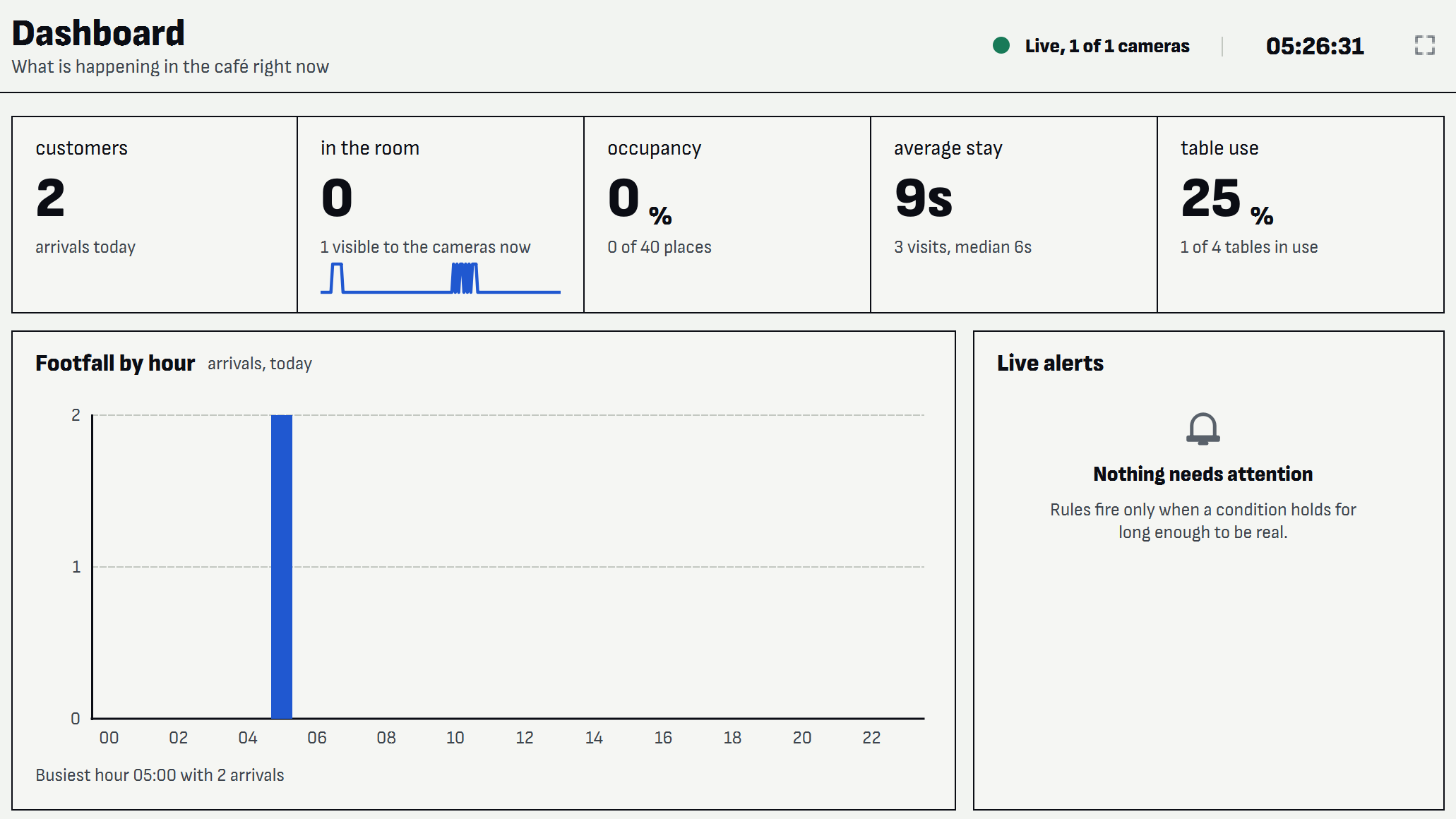
What is happening in the café right now
The numbers an owner checks first, with the detail behind them underneath. Average stay sits beside the median, so one long sitter does not bend the picture. The camera in this recording watches a dining room with no counter in view, so the queue figures read “not calibrated” where a guess would otherwise go.
What each camera sees, and what the engine makes of it
The screen that earns your trust. Every line, zone and table you drew is on the picture, each person carries an anonymous number, and each table says its state in words. When it is wrong, you can see that it is wrong.
Which parts of the room people use
Six heat pictures over the camera's own view, the zones people prefer, and where they go next. Filter by camera, and by today, yesterday, seven or thirty days.
This period against the one before it
One table that answers whether this week was better than last, and a minute-by-minute trend you can drag and zoom. Better or worse is written out, never left to colour alone.
Conditions that held long enough to matter
Occupancy too high, queue too long, waiting too long, queue not attended, table left uncleared. Each critical alert keeps one small picture as evidence, in a folder capped at 200 MB.
Setup is a drawing exercise
You draw on the camera's own picture, without floor plans or a tape measure, and the screen tells you what this camera can measure with what you have drawn and what is still missing.
Every screen is the application running on test recordings. Faces are pixelated for publication.
It runs where you can see it
One application and one database file, on a Windows PC in your own back office, with no cloud account to open.
- Reads network cameras and recorder channels, USB cameras, MJPEG streams and video files
- Up to four cameras, each on its own worker
- Network streams reconnect by themselves, backing off from one second to thirty
- You choose how long data is kept, and delete older data on demand
What it does not contain
None of these can be switched on, because none of them was ever built.
- Not included: Facial recognition
- Not included: Identity, or recognising someone on a second visit
- Not included: Emotion detection
- Not included: Continuous recording
- Not included: Scoring of individual staff
- Not included: Video in the database
One thing can leave the building, and only if you switch it on: the optional written summary, which sends the day's totals to OpenAI to be put into sentences and never a frame, a track, or anything about a person. The daily report works without it and without any internet connection.
Your table. Thirty days, one camera, no charge.
“What has my room been doing?”
Your email app should have opened.
The request is written out and ready to send. If nothing opened, write to sales@techub.kr with your café's name and how many cameras you have.
We help you draw the lines. At the end you have three weeks of your own footfall, dwell and table use to argue with.
- Every screen, unrestricted, on one camera
- It runs on a PC you already have
- Your data stays yours, and stays in your building
After the pilot, the price is on request. Tell us how many rooms and cameras you have and we will quote.
Asked first
Do I need to buy new cameras?
Almost certainly not. It reads network cameras and recorder channels, USB cameras, MJPEG streams and video files.
What does it run on?
A Windows PC in your back office. A graphics card makes it faster, and it also runs without one.
How long does setup take?
Entering the cameras takes minutes. Drawing is the real work: a camera measures nothing until you draw on it, and the screen tells you exactly what is still missing.
How accurate is it?
That depends on your camera angle more than on anything else, which is why Live view draws what the engine thinks it sees onto the picture. We will not quote you an accuracy figure we have not measured in your room.